Prefer an AI assistant? Connect Claude or ChatGPT via Padel Analyst.
Authentication
The Padel API uses API tokens to authenticate requests. These are provided to you on your API Tokens management page. To authenticate, you need to include anAuthorization header in all of your requests. In this header, you must state that you’re using an API token (similar to HTTP basic access authentication).
For example:
Authorization header at all, you’ll receive a 401 status code as response
Tournaments Coverage
To guarantee the highest data quality and consistency, Padel API currently focuses on the following tournament levels. This ensures comprehensive and timely coverage of draws, schedules, matches, results, and statistics. Feature availability varies by tournament level. Refer to the tables below for the current availability of Score, Qualy, Live, and Stats coverage. For guidance on keeping your local data up to date, see the Data Synchronization guide.Padel FIP & Premier Padel
Lower-tier events (such as FIP Rise, FIP Promises, and national or exhibition events) may have incomplete or inconsistent data at the source, so we cannot guarantee the same quality.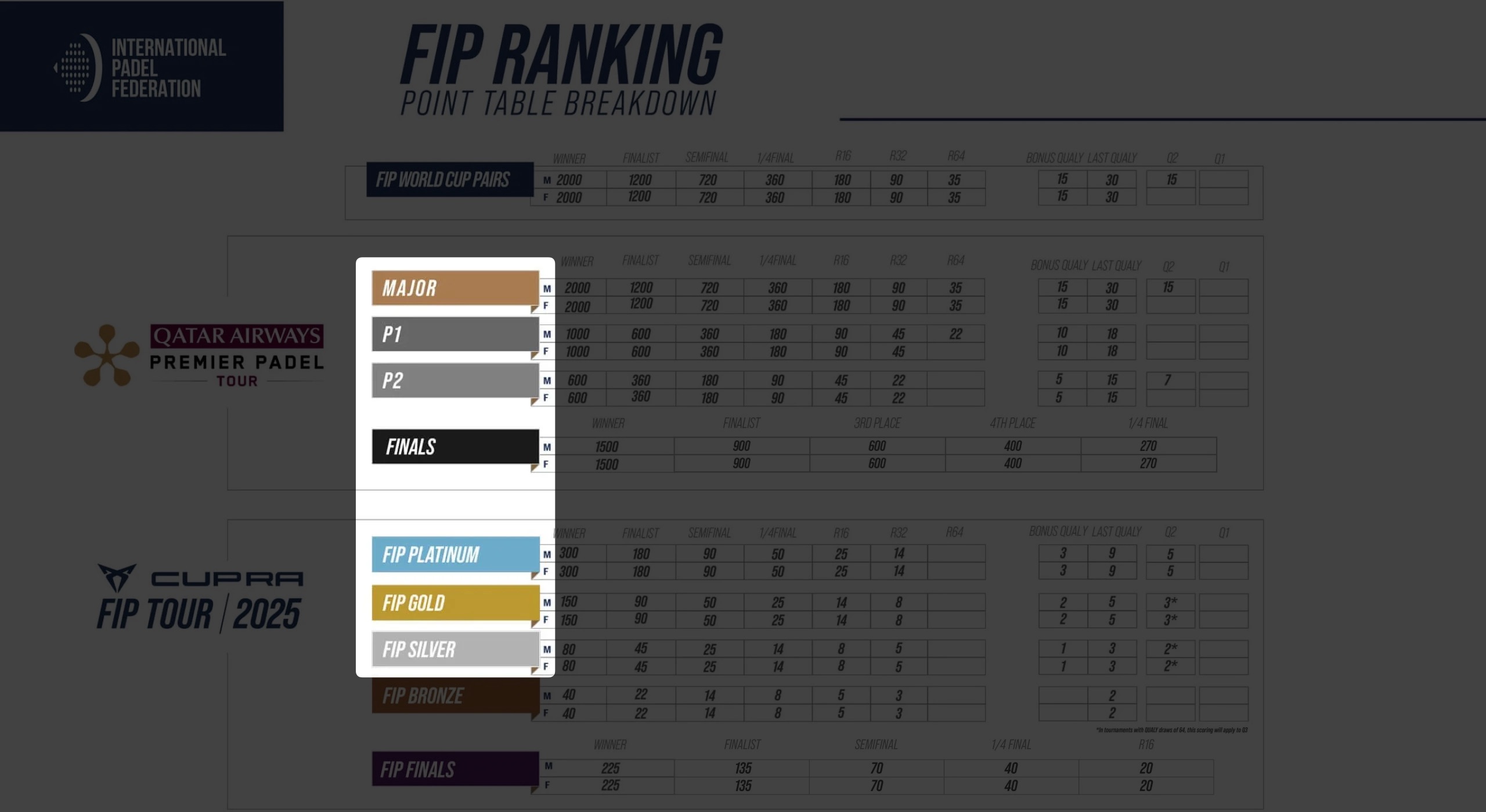
*Other tournaments may include manually curated individual FIP events of particular relevance, such as the FIP World Cup Pairs.
World Padel Tour
The World Padel Tour (WPT) was the leading professional circuit until 2023. We provide scores for its main event categories. Qualy, Live and Stats data are not available at this level.Padel Pro Tour
The Padel Pro Tour (PPT) was the main professional circuit in Spain and the predecessor of the World Padel Tour. We provide scores for its full range of event categories. Qualy, Live and Stats data are not available at this level.Historical Coverage
Our historical depth varies by season, and we are continuously expanding it as more data meets our quality standards.From 2023 onwards, we provide complete draws for the covered tournament levels — every round, from the opening round through to the final.From 2006 to 2023, we currently provide finals only. We are actively reconstructing the earlier rounds of these events and will add them as they become available.
Rate Limits
The Padel API limits the number of requests you can make to protect the service and ensure fair usage for all users.
When you exceed a rate limit, the API returns a
429 Too Many Requests error. Wait until the limit resets before making additional requests.
The API includes the following headers in responses to help you track your usage:
You can track your API usage at any time from the Logs & Quota page. It shows a detailed breakdown of your recent requests, along with your daily and monthly quota consumption, so you always know how much of your plan you’ve used and how much remains.
Pagination
Several endpoints return paginated results. By default, the Padel API only returns the first 15 results for those endpoints. You can use optional query parameters to increase or decrease the number of results.Status Codes
The Padel API uses conventional HTTP response codes to indicate whether a request was successful (2XX codes) or resulted in an error (4XX and 5XX codes).
See the Padel API Response Codes page for what each code means and how to handle it.